|
| Recent Posts | - May, 2025-5,(1)
- April, 2025-4,(1)
- January, 2025-1,(1)
- July, 2024-7,(1)
- May, 2024-5,(2)
- May, 2023-5,(1)
- February, 2023-2,(1)
- November, 2022-11,(1)
- July, 2022-7,(2)
- March, 2022-3,(1)
- November, 2021-11,(2)
- August, 2021-8,(2)
- July, 2021-7,(2)
- June, 2021-6,(1)
- May, 2021-5,(1)
- March, 2021-3,(1)
- February, 2021-2,(2)
- January, 2021-1,(7)
- December, 2020-12,(3)
- March, 2020-3,(2)
- February, 2020-2,(1)
- December, 2019-12,(2)
- November, 2019-11,(1)
- October, 2019-10,(1)
- September, 2019-9,(1)
- August, 2019-8,(1)
- May, 2019-5,(1)
- April, 2019-4,(2)
- March, 2019-3,(2)
- December, 2018-12,(1)
- November, 2018-11,(4)
- July, 2018-7,(1)
- May, 2018-5,(3)
- April, 2018-4,(2)
- February, 2018-2,(3)
- January, 2018-1,(3)
- November, 2017-11,(2)
- August, 2017-8,(1)
- June, 2017-6,(3)
- May, 2017-5,(5)
- February, 2017-2,(1)
- December, 2016-12,(1)
- October, 2016-10,(2)
- September, 2016-9,(1)
- August, 2016-8,(1)
- July, 2016-7,(1)
- March, 2016-3,(2)
- February, 2016-2,(3)
- December, 2015-12,(5)
- November, 2015-11,(5)
- September, 2015-9,(1)
- August, 2015-8,(2)
- July, 2015-7,(1)
- March, 2015-3,(2)
- February, 2015-2,(1)
- December, 2014-12,(4)
- July, 2014-7,(2)
- June, 2014-6,(2)
- May, 2014-5,(3)
- April, 2014-4,(3)
- March, 2014-3,(1)
- December, 2013-12,(2)
- November, 2013-11,(1)
- July, 2013-7,(1)
- June, 2013-6,(2)
- May, 2013-5,(1)
- March, 2013-3,(3)
- February, 2013-2,(3)
- January, 2013-1,(1)
- December, 2012-12,(3)
- November, 2012-11,(1)
- October, 2012-10,(1)
- September, 2012-9,(1)
- August, 2012-8,(1)
- July, 2012-7,(6)
- June, 2012-6,(1)
- April, 2012-4,(1)
- March, 2012-3,(3)
- February, 2012-2,(3)
- January, 2012-1,(4)
- December, 2011-12,(3)
- October, 2011-10,(3)
- September, 2011-9,(1)
- August, 2011-8,(10)
- July, 2011-7,(2)
- June, 2011-6,(7)
- March, 2011-3,(2)
- February, 2011-2,(3)
- January, 2011-1,(1)
- September, 2010-9,(1)
- August, 2010-8,(2)
- June, 2010-6,(1)
- May, 2010-5,(1)
- April, 2010-4,(3)
- March, 2010-3,(2)
- February, 2010-2,(3)
- January, 2010-1,(1)
- December, 2009-12,(3)
- November, 2009-11,(3)
- October, 2009-10,(2)
- September, 2009-9,(5)
- August, 2009-8,(3)
- July, 2009-7,(9)
- June, 2009-6,(2)
- May, 2009-5,(2)
- April, 2009-4,(9)
- March, 2009-3,(6)
- February, 2009-2,(4)
- January, 2009-1,(10)
- December, 2008-12,(5)
- November, 2008-11,(5)
- October, 2008-10,(13)
- September, 2008-9,(10)
- August, 2008-8,(7)
- July, 2008-7,(8)
- June, 2008-6,(12)
- May, 2008-5,(14)
- April, 2008-4,(12)
- March, 2008-3,(17)
- February, 2008-2,(10)
- January, 2008-1,(16)
- December, 2007-12,(6)
- November, 2007-11,(4)
|
|
|
|
|
Add Remove Programs not displaying
|
3/7/2008 10:01:09 AM
|
|
|
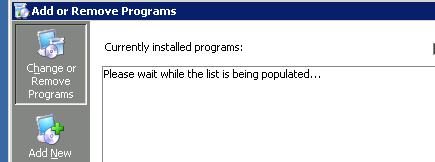
While trying to remove Polyserve Hotfix 4, i've consistently run into a problem with the add remove programs not displaying any programs.
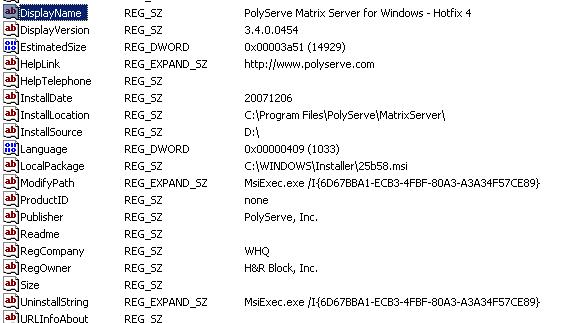
Polyserve Hotfix 4 must be removed before applying hotfix 5. Open up Control Panel, Add / Remove Programs, and nothing. The list just never populates. Reboot, Reboot, nothing. Out of frustration I know the uninstall is just a program, so I search the registry for the uninstall string, cut and paste that out, and run it from the command line. See Picture below for registry, not sure if the guid is the same for all installations, so always check. The string I ran was:
MsiExec.exe /I{6D67BBA1-ECB3-4FBF-80A3-A3A34F57CE89}
Worked well, I still have no idea why the list won't populate, but I've had this issue on several windows 2003, 64 bit, sp2 machines running polyserve. It makes applying a hotfix frustrating.
The Add or Remove Programs screen never populates.
Registry entry which shows string to run to uninstall, UninstallString.
|
Blog Home
|
|